Why Tintero?
The natural evolution of writing tools
Built for the new generation of writers
Tintero combines decades of experience in writing tools with modern technology and a user-centric approach.Modern and Intuitive Design
21st-century interface that lets you start writing immediately, without complex learning curves.
Real Automatic Sync
Your work updates instantly across all your devices, with no manual processes or data loss.
Specifically for Authors
Every feature is designed for creative writers, not a repurposed word processor.
Democratic Development
Users can propose and vote for new features. Your voice shapes Tintero's future.
Writing
An editor built for long texts
From first draft to final pass, without switching tools.
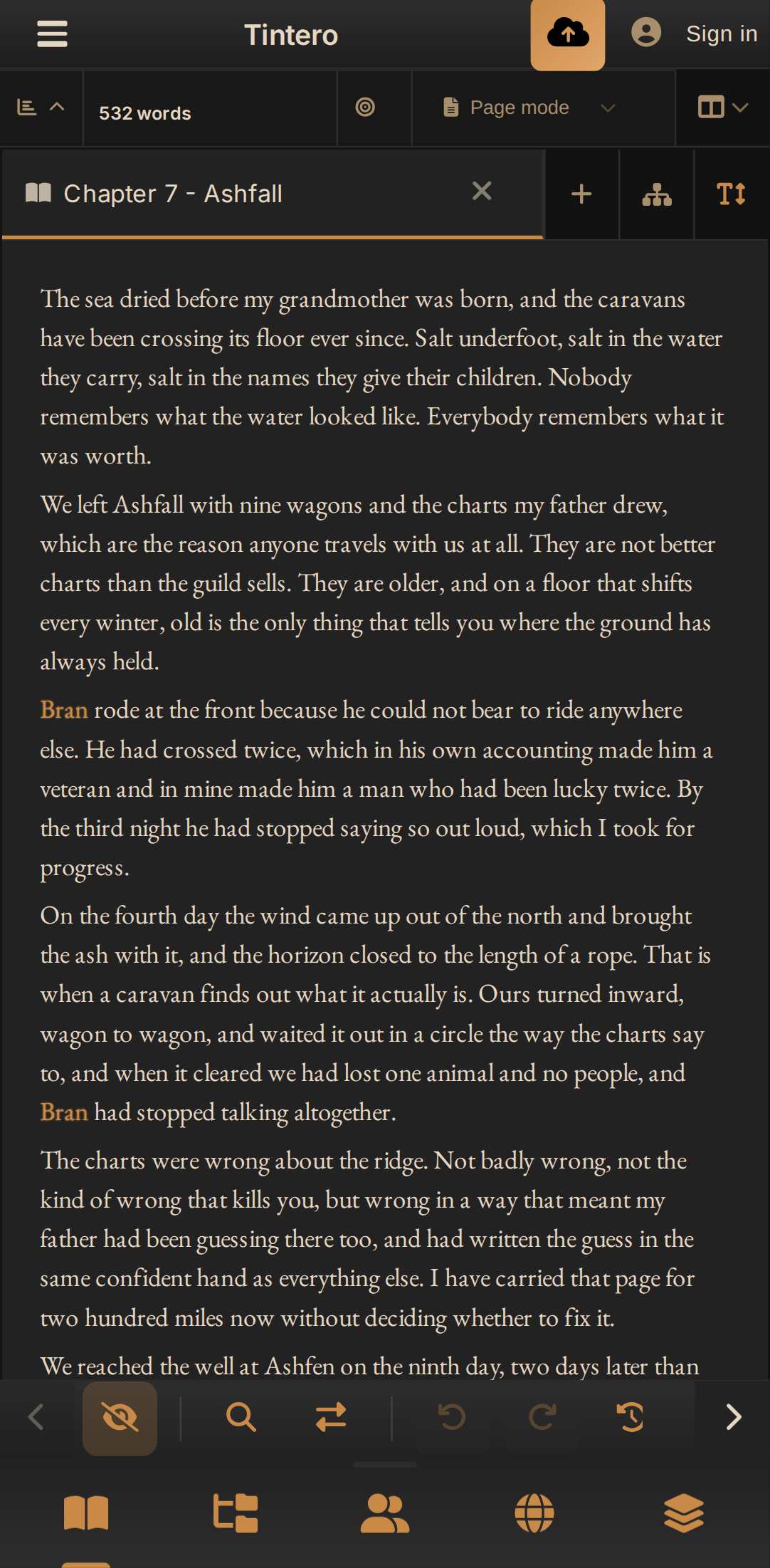
Tabs, split screen and layouts
Chapters and profiles in tabs, up to nine documents on screen, and on desktop, detached windows for a second monitor. Every document reopens where you left off.
Writing modes
Page view with ruler and margins, typewriter mode, and distraction-free mode with the sprint clock on top.
Real writing on your phone
A writing mode with a bottom bar that follows the keyboard, gestures to pull out panels and leave, and split screen plus a four-pane grid on tablets.
Scene system
Collapsible scene blocks with point of view, purpose, type (flashback, dream, prologue), location and characters present.
Screenplay mode
Formats scene headings, character cues, parentheticals and transitions as you type. Imports and exports Fountain and Final Draft.
Pure Markdown, with vim keys
If you prefer plain text, a real Markdown mode with vim keybindings, on desktop and on the web.
More than text
Images with a built-in editor, PDFs in the project tree, audio, YouTube or Vimeo videos and flow maps embedded right inside the chapter.
Layered review that leaves your text alone
Review passes that underline and comment on the chapter without rewriting it: from a plugin such as LanguageTool, from your agent over MCP, or from the AI. Each pass lives in its own layer, and you choose what to show, what to keep as a note and what to dismiss.
Small helpers that add up
Smart quotes for your language, dialogue dashes, character-name autocomplete, footnotes, a slash menu, math symbols, selection word count, clipboard history and special characters.
Sticky notes
Notes pinned to the text for reminders, ideas or revision comments, without cluttering the manuscript.
Spell checking in 12 languages
Spelling and punctuation checks that respect your story's proper names. And if your language isn't there, load your own dictionaries.
Reading simulator
Read your manuscript the way your reader will: a clean book-like view with no editing tools in the way.
Planning
See the whole story, not just the chapter
Every way of planning has its own view, and all of them draw on the same project.
PlotGrid
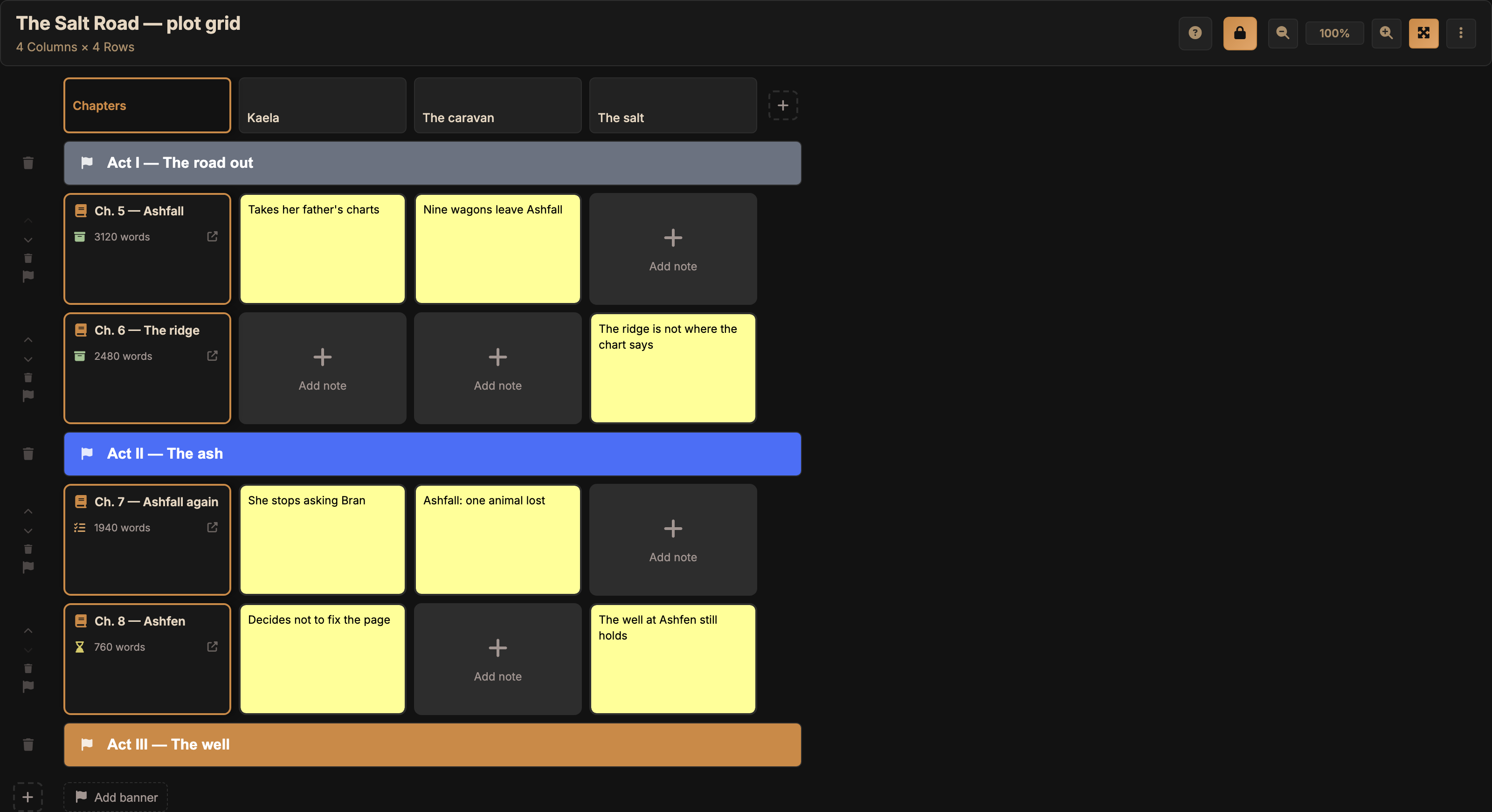
A grid that crosses plotlines with chapters, with acts and a pacing view, so you can see which arc moves where and which one you haven't touched in three chapters.
Corkboard
Index cards you drag around to order ideas, scenes and tasks, with links to characters and world elements. On desktop it opens in its own window.
Timeline
Lines and sub-lines, world events, named milestones and spans, invented calendars and zoom from centuries down to hours. Double-click a scene to open it.
Flow maps
A node canvas with a freehand whiteboard and stylus support, for decisions, scenes, sources or anything you need to connect with arrows. And they embed right inside the chapter they explain.
Project map
A graph that draws itself from how characters, places, chapters and world elements relate to each other.
Beatsmap
Each character's beats per chapter, open and resolved conflicts, and a pacing strip to spot where the tension drops.
Outline and chapter board
Cards per folder that edit the chapter right there, a kanban board by status (draft, review, finished…) and smart collections.
Over 30 templates
Hero's journey, Save the Cat, kishōtenketsu, seven-point, romance, mystery… plus thesis, research paper, screenplay, graphic novel, RPG campaign or business plan.
Characters and world
Your world lives next to the text
Profiles the editor recognises wherever they appear.
Complete worldbuilding
Thirteen entity types (cultures, places, factions, magic systems, languages…) and custom categories with conditional fields and tabs. With aliases the text recognises just like the name, over a hundred icons and attached images.
In-depth character sheets
Eight tabs, from identity to conflicts, archetype and backstory, with RPG stats, personality axes, images and versions of the character over time. And they can be shown as an RPG sheet, a dossier or an encyclopedia entry, exportable to PDF as they look.
Automatic highlighting
The editor marks every character and world element wherever it appears, with its profile on hover. And when two names clash, you tell it "this isn't them" and it learns.
Relationships and family tree
Dozens of relationship types by category (family, power and hierarchy, plot…), with lineage and union status. The family tree works out kinship by itself and exports to PNG or SVG.
Name generator
Character names for when the block starts with what someone is called.
Portable worlds
Export characters and world, images included, to a .tworld file and reuse it in the sequel, or start a new project from it.
Study and research
Also for theses, papers and notes
What academic writing needs, no plugins required.
Sources, citations and bibliography
Keep books, articles and web pages, cite with "/cite" in APA 7 or Chicago, and the bibliography builds itself. Citations survive export.
Zotero
On desktop, bring in references from your Zotero 7 library without breaking the citations you already have.
A profile for each use
Creative, study and work, or minimalist: each profile only shows the tools you're going to use.
Publishing and export
From draft to typeset book
Your writing goes in and out in open formats. Nothing gets trapped inside.
Book Studio
Typeset the book without leaving the app: print trim sizes, mirror margins, embedded fonts, running headers, page numbering, ISBN, cover, table of contents and live preview. Outputs PDF, EPUB, DOCX or HTML.
Export to 11 formats
PDF, DOCX, ODT, RTF, EPUB, HTML, Markdown, plain text, Fountain, LaTeX and Final Draft, one chapter at a time or in batches.
Bring what you already have
Whole projects from Scrivener, novelWriter and Bibisco, and DOCX, ODT, RTF, Markdown, HTML, Fountain, LaTeX or Final Draft files, one at a time or several at once.
Read aloud and audiobooks
Listen to your text with system voices or offline neural voices, and export each chapter's audio with a different voice for every character.
Dictation
Dictate instead of typing, offline too.
Beta readers
Share chapters through a link that opens in the browser, open or limited to a list of emails, with an expiry date. Your readers comment without installing anything.
Sync and safety
Your writing, safe and wherever you need it
Local by default. The cloud only if you want it, and the one you choose.
Windows, Linux, Android, Mac and browser
The same app on desktop, on your phone and on the web, installable as a PWA. Mac is in beta; iPhone and iPad are in development.
Real-time sync
Tintero Live syncs phone, tablet and computer instantly, with a compare view to decide what stays when two versions collide. With end-to-end encryption the key is yours alone, and in the browser you unlock it with your fingerprint or a passkey.
Your cloud, your choice
Keep the project in Google Drive or Dropbox, or on your own Nextcloud, ownCloud or WebDAV server from desktop. OneDrive is coming soon.
Sync with git
Connect the project to a Forgejo, Gitea, GitLab or GitHub repository and keep your novel's history as commits, even as Markdown and JSON, fully readable.
History and restore points
Automatic and manual restore points, and a side-by-side compare view to bring back a chapter, or the whole project, exactly as it was.
A protected account
Two-step verification with an authenticator app and backup codes, and important account changes are confirmed by email.
Consistency
Write a little every day
Data to see how you're doing, without turning writing into a video game.
Goals that fit you
Words, chapters, characters, minutes or streak, per day, week, month or in total.
Statistics
An activity calendar, charts for writing, characters, world, time and prose, and the frequency of your most repeated words.
Sprints and pomodoro
Timed sessions with a floating clock and a distraction-free sprint mode. They travel with your account, and the statistics show which hours you write best.
Screen lock
Lock the app in focus mode, or completely, until the timer runs out or you enter the password.
Streaks
Badges at 7, 30 and 100 days of writing in a row.
Make it yours
Shape Tintero around how you write
Themes, languages, plugins and a community behind it.
29 themes, plus yours
Light, dark, high-visibility sepia, OLED, Solarized, Catppuccin… Create your own themes and share them with the community.
Interface in 15 languages
English, Spanish, Catalan, French, Italian, Portuguese, German, Dutch, Polish, Romanian, Hungarian, Russian, Turkish, Indonesian and Thai, with translation open to the community.
Plugin system
Build your own plugins with a sandboxed, secure SDK, or install the community's: panels, tools, exporters, importers and reviewers. They let you know when there's an update.
Tutorials and Inky
Guided tours and a helper, Inky, that searches the tutorials and changes settings for you. No AI: it works offline.
Writers community
Tintero Nexus: publish, build worlds with others and get feedback from other authors.
Democratic development
Propose features and vote on other people's. The most voted get built first.
Optional AI
AI, only if you want it
Tintero is a complete editor without it. AI is one more tool, not the heart of the app, and it disappears with a single checkbox.
Hidden with one checkbox
When you install, or any time later in Settings › Editor › Writing Assistance, tick "Hide AI features" and the AI chat, menus and buttons disappear from the interface.
It never acts on its own
It only runs when you ask, nothing is sent in the background, and you review every result before it touches your text.
You choose the model
Models on your own computer with Ollama or LM Studio, free and without the text leaving the machine, or cloud models with a token system. We don't keep your writing and it isn't used for training.
What it does if you turn it on
A chat that understands your project, and from a chapter it builds outlines, study sheets, review quizzes or flow maps, always as new documents.
Your own agent, over MCP
On desktop, connect Claude Code, Cursor or another agent to the open project, with read-only or full access.
Your Voice in Tintero's Development
Community-driven development
🏛️ Software Democracy
Tintero is more than a tool: it's a platform built by writers, for writers. Our integrated proposal system lets every user actively shape the software's future.
- Propose features you need for your creative process
- Vote on the most innovative ideas from other writers
- Debate and refine proposals with the community
- Track development in real-time for the most voted features
- Get credit when your idea is implemented
The most voted features by the community take absolute priority in our development roadmap.

2026 Roadmap
Features Coming Soon
Tintero's future includes even more powerful tools for professional writers
Synonyms Dictionary
Find the perfect word without leaving the app. Contextual dictionary suggesting synonyms based on your narrative tone.
Advanced Text Analysis
AI-powered style analysis, repetition detection, and suggestions to enhance your writing's flow and coherence.
Self-Publishing
Sell your books directly in the app or let other users read them for free.
Real-Time Collaboration
Write with co-authors simultaneously. See changes in real-time and manage edit conflicts automatically.
iPhone and iPad
Tintero on iPhone and iPad, with the same sync you already have on Windows, Mac, Linux and Android.
Ready to revolutionize your writing?
The evolution of writing tools
Tintero takes the best from other tools and enhances it with modern technology, real sync, and a focus on the 21st-century writer's experience.
Join the first writers already discovering a new way to create stories. During the beta, all premium features are completely free.
Questions about the features
What people ask most about how it works underneath
Can I show a chapter to someone who doesn't use Tintero?
Yes. Pick the documents you want and Tintero creates a link that opens in a browser, with nothing to install. You can leave it open to anyone with the link or restrict it to a list of email addresses, allow or block downloads, and give it an expiry date.
What happens if I edit the same chapter in two places while offline?
Neither version is lost, and the last one to upload does not just win. Tintero flags the conflict and opens a full-screen comparator with both versions side by side, much like resolving one in git: you review each side and decide what stays. What comes out of that is what gets uploaded.